Introduction: Finding Your Perfect CRM Match
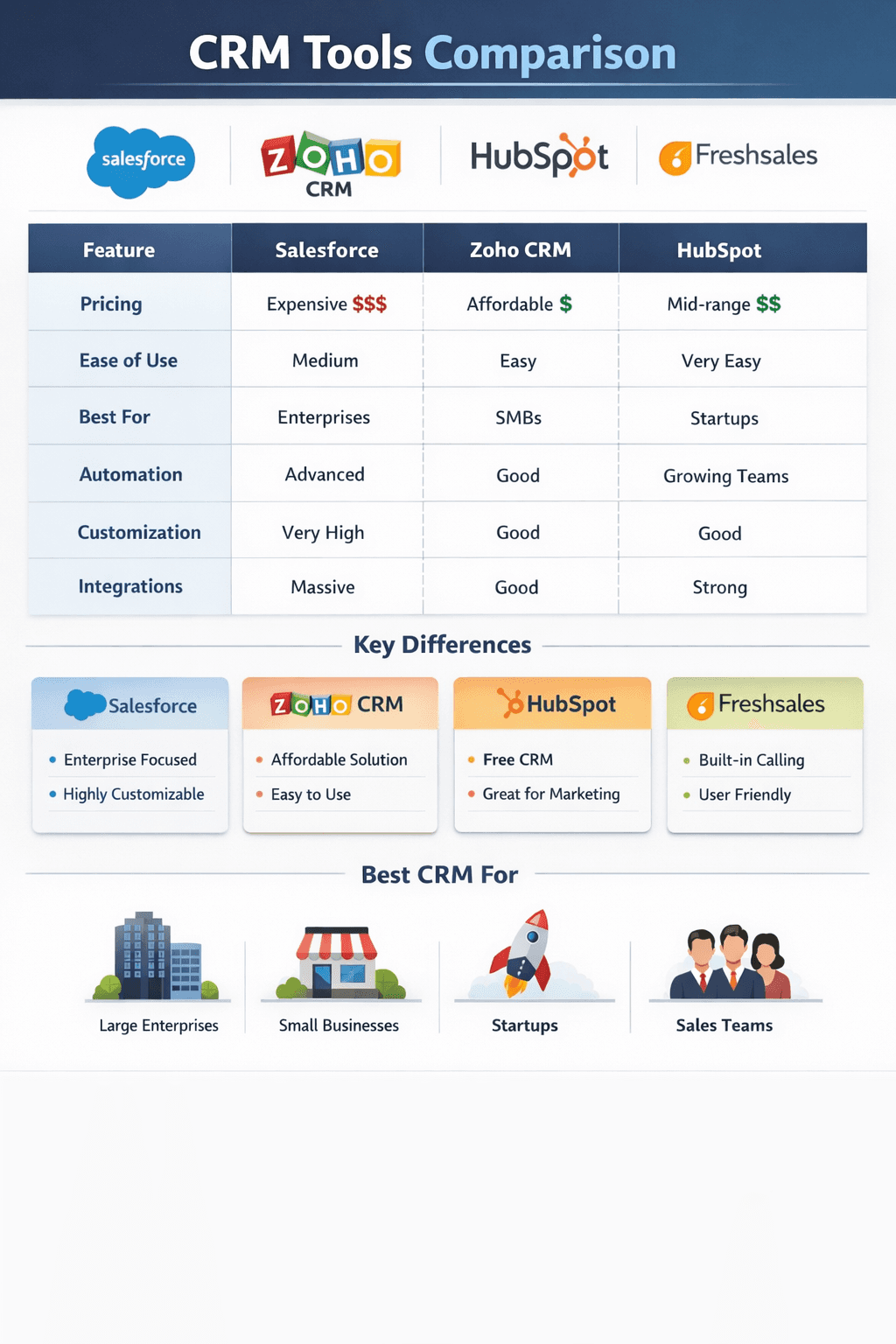
With hundreds of CRM tools on the market, choosing the right one can feel overwhelming. Should you go with a free, open‑source platform or invest in a paid solution? Is a CRM enough, or do you also need ERP or CMS? This guide cuts through the noise: we’ll reveal the best CRM tools for startups, clarify the differences between CRM, ERP, and CMS, and help you decide between open‑source and paid CRM based on your business size, budget, and technical resources.
1. Best CRM Tools for Startups (2026)
Startups need CRM software that is affordable, easy to set up, and scales as they grow. Here are the top contenders, ranked by popularity and startup‑friendliness:
| CRM Tool | Best For | Free Plan | Paid Starts At | Standout Startup Feature |
|---|---|---|---|---|
| HubSpot CRM | All‑in‑one growth | ✓ Unlimited users, up to 1M contacts | $15/user/month | Generous free tier, marketing tools included |
| Zoho CRM | Budget‑conscious teams | ✓ Up to 3 users | $14/user/month | Affordable, extensive integrations with Zoho suite |
| Pipedrive | Sales pipeline focus | ✗ 14‑day trial | $14/user/month | Visual, intuitive pipeline; ideal for early sales teams |
| Freshsales | AI‑powered sales | ✓ Unlimited users (basic) | $15/user/month | Built‑in phone, email, and lead scoring |
| Salesforce Starter | Scalable enterprise potential | ✗ 30‑day trial | $25/user/month | Industry leader; start small, grow big |
| Monday Sales CRM | Visual project management | ✗ 14‑day trial | $12/user/month | Highly visual boards, combines work management with CRM |
Pro tip for startups: Start with a free or low‑cost plan, focus on core features (contact management, pipeline tracking), and only add advanced modules when your processes mature. HubSpot’s free plan is often the most popular starting point due to its unlimited users and rich functionality.
2. CRM vs ERP vs CMS: Key Differences
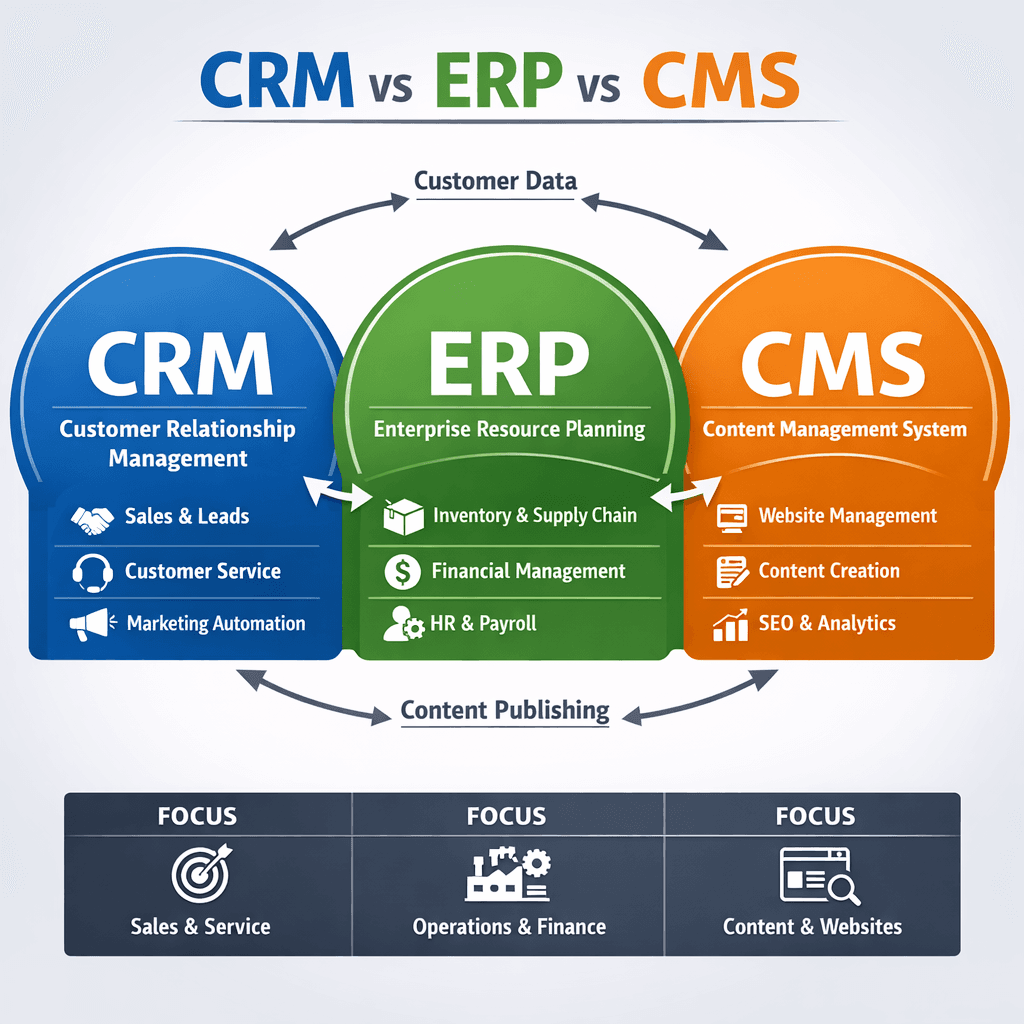
These three acronyms are often confused. Here’s a simple breakdown:
CRM (Customer Relationship Management) – Manages interactions with prospects and customers. Focus: sales, marketing, support. Goal: improve relationships and grow revenue. ERP (Enterprise Resource Planning) – Manages internal business processes: finance, inventory, HR, supply chain. Goal: streamline operations and provide a single source of truth for back‑office functions. CMS (Content Management System) – Manages digital content: websites, blogs, documents. Goal: enable non‑technical users to publish and organize content easily.
| Category | Primary Users | Key Functions | Examples |
|---|---|---|---|
| CRM | Sales, Marketing, Support | Lead management, pipeline, ticketing, marketing automation | HubSpot, Salesforce, Zoho |
| ERP | Finance, Operations, HR | Accounting, inventory, order management, payroll | SAP, Oracle NetSuite, Microsoft Dynamics |
| CMS | Marketing, Content Teams | Page editing, blogging, media management, SEO | WordPress, Contentful, Shopify (for e‑commerce) |
When to use each:
- A startup typically starts with a CRM to organize customer data and sales.
- If you manufacture or sell physical products, you’ll eventually need an ERP to manage inventory, procurement, and accounting.
- For marketing and website content, a CMS is essential; many modern CRMs (like HubSpot) include a built‑in CMS, reducing the need for separate tools.
3. Open‑Source vs Paid CRM: Which One Should You Choose?
Open‑source CRMs (like SuiteCRM, Odoo, or Vtiger) give you full control and zero licensing fees. Paid CRMs (SaaS like HubSpot, Salesforce) offer convenience, support, and rapid deployment. Here’s how they compare:
| Factor | Open‑Source CRM | Paid (SaaS) CRM |
|---|---|---|
| **Cost** | Free software; pay for hosting, development, and maintenance | Monthly/annual subscription per user; predictable pricing |
| **Customization** | Unlimited (if you have developer skills) | Limited to platform capabilities (but often extensive via APIs/apps) |
| **Deployment time** | Weeks to months (setup, hosting, configuration) | Minutes to days (sign up, configure, start using) |
| **Maintenance** | Self‑managed: updates, security, backups | Vendor‑managed; automatic updates and security patches |
| **Support** | Community forums; paid support optional | 24/7 vendor support (varies by plan) |
| **Scalability** | Requires technical planning | Built to scale; add users/features instantly |
| **Integrations** | Often limited; may need custom coding | Extensive pre‑built integrations (e‑commerce, email, etc.) |
When to choose open‑source CRM:
- You have in‑house development resources.
- You need extreme customization (e.g., industry‑specific workflows).
- You’re comfortable managing servers, security, and upgrades.
When to choose paid (SaaS) CRM:
- You want to go live quickly with minimal IT overhead.
- You prefer predictable monthly costs.
- You need reliable support and automatic updates.
- Your team is non‑technical.
Real‑World Decision Framework
Still unsure? Use this simple framework to evaluate your options:
- Budget – If you have $0–$50/month, start with a free SaaS CRM (HubSpot, Zoho) before considering open‑source (which requires hosting costs).
- Technical resources – No developer on staff? Go SaaS. Developer available? Open‑source becomes viable.
- Customization needs – Off‑the‑shelf SaaS meets 80% of small business needs. If you need highly tailored workflows, open‑source might be better.
- Growth plans – SaaS CRMs scale seamlessly; open‑source requires planned upgrades and may hit performance bottlenecks without proper infrastructure.
Conclusion: Make the Informed Choice
Selecting the right CRM—and understanding where it fits alongside ERP and CMS—is crucial for building a scalable tech stack. Startups usually benefit from a free or low‑cost SaaS CRM that allows quick experimentation. As you grow, you can evaluate open‑source alternatives if you need deep customization or tighter budget control. Remember: the best CRM is the one your team actually uses, so prioritize ease of use and adoption over bells and whistles.
🔍 **Compare CRMs side‑by‑side** – [Download our Free CRM Comparison Matrix](/resources/crm-comparison-matrix) to evaluate features, pricing, and user reviews for the top 10 CRM tools. Or, take our 2‑minute quiz to get personalized recommendations for your startup.
Share This Article
📤 Share This