Introduction: Why CRM Implementation Fails
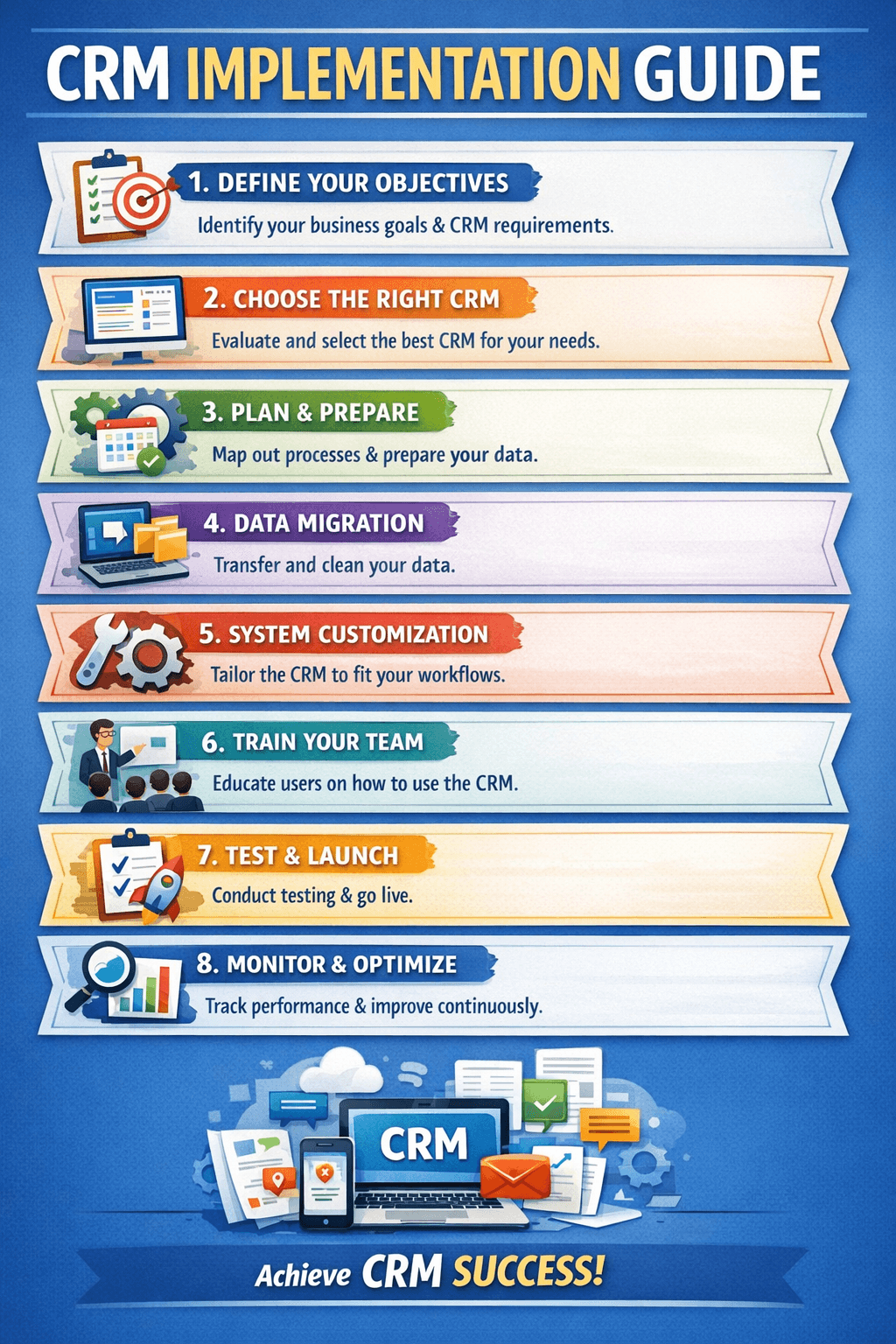
You’ve selected the perfect CRM. Now comes the make‑or‑break phase: implementation. Studies show that nearly 30% of CRM projects fail to meet expectations, and the #1 cause isn’t the software—it’s poor planning and execution. A successful rollout requires clear steps, careful data migration, and a strategy to get your team on board. This guide walks you through the entire implementation journey, highlights common pitfalls, and gives you a proven framework to avoid them.
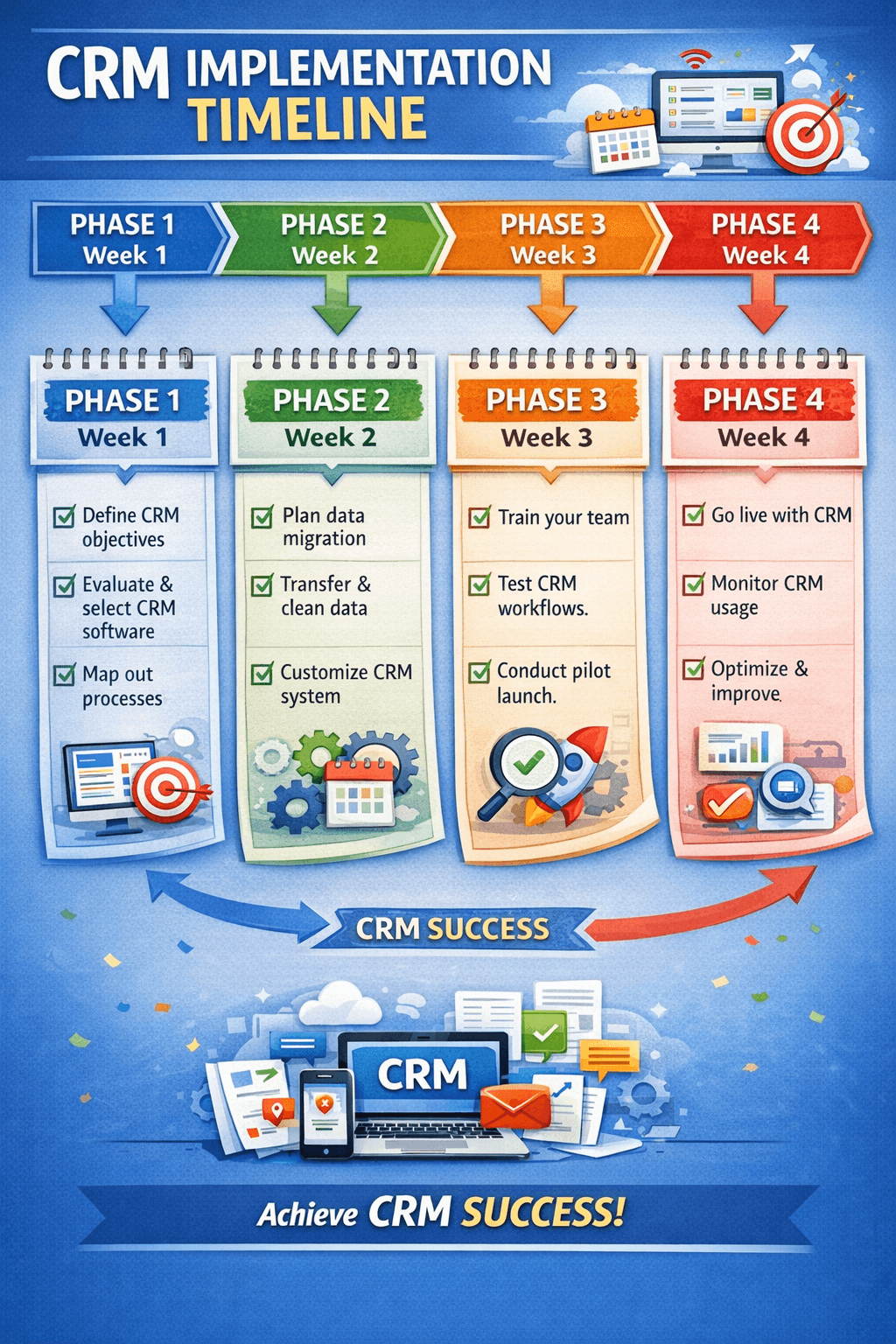
Phase 1: Pre‑Implementation Planning (2–4 Weeks)
Skipping this phase is the fastest way to implementation failure. Invest time upfront to align goals, people, and processes.
1. Define clear objectives – What specific problems will the CRM solve? (e.g., reduce lead response time, increase cross‑selling, centralize support tickets). Write measurable goals. 2. Assemble an implementation team – Include a project owner, a power user from each department (sales, marketing, support), and IT if needed. Empower them to make decisions. 3. Map your current processes – Document how leads are captured, how deals move, and how support is handled. Identify bottlenecks before building them into the CRM. 4. Clean your existing data – Remove duplicates, fix formatting, and decide what to archive. Dirty data migrated = dirty data in the new system.
Phase 2: Configuration & Customization (1–4 Weeks)
Now you translate your processes into the CRM. Resist the urge to over‑customize—start simple and iterate.
Set up user roles & permissions – Define who can view, edit, or delete what. This prevents data chaos. Build your sales pipeline stages – Use your mapped process to create stages that reflect your real sales cycle (e.g., Lead → Contacted → Demo → Proposal → Closed). Customize fields & layouts – Add only fields that your team will actually use. Too many fields kill adoption. Configure automation – Start with simple automations: lead assignment, task creation on deal stage change, and email follow‑ups. Integrate with existing tools – Connect email (Gmail/Outlook), calendar, accounting software (QuickBooks, Xero), and any marketing platforms.
Phase 3: Data Migration Strategy
Data migration is often the most underestimated part of CRM implementation. A poor migration can corrupt your database, ruin reporting, and erode team trust. Follow this structured approach:
Step 1 – Audit your source data – List all data sources (spreadsheets, old CRM, email lists, accounting software). Identify what’s essential, what’s outdated, and what’s redundant. Step 2 – Cleanse before you move – Deduplicate records, standardize formats (e.g., phone numbers, dates), fill missing critical fields. Use tools like OpenRefine or Excel Power Query for large datasets. Step 3 – Map fields – Create a mapping document that shows where each source field goes in the new CRM. For example, “Old_Lead_Status” → “Lead_Status” (with value translation). Step 4 – Test migration – Do a trial run with a subset of records (e.g., 100 contacts). Verify data integrity, relationships (e.g., contacts linked to accounts), and custom fields. Step 5 – Full migration & verification – After testing, perform the full migration. Run post‑migration validation scripts to catch errors. Keep backups of the original data.
| Migration Pitfall | Why It Happens | Prevention |
|---|---|---|
| Duplicate records | No deduplication before import | Use CRM’s dedupe tools or merge before migrating |
| Lost field values | Mismatched field types or picklist values | Thorough field mapping and test run |
| Broken relationships | Parent‑child links not preserved | Ensure IDs are carried correctly; use import templates |
| Missing attachments | Attachments not transferred | Use migration tools that support files, or plan manual uploads for critical docs |
Phase 4: Testing & User Training
Before going live, run the system with a small group of power users. Their feedback will uncover issues you missed.
User acceptance testing (UAT) – Have 5–10 users perform daily tasks for 1–2 weeks. Log every bug, workflow gap, and usability issue. Create training materials – Don’t just rely on vendor tutorials. Build short, role‑specific guides and videos (e.g., “How sales reps log calls” vs. “How managers view dashboards”). Schedule live training sessions – 60‑minute interactive sessions per department. Cover the “why” (benefits for them) as much as the “how”. Designate internal champions – Identify enthusiastic early adopters who can help peers with quick questions after launch.
Phase 5: Go‑Live & Post‑Launch Support
Launch day is not the end—it’s the beginning of continuous improvement.
Phased rollout vs. big bang – For smaller teams, a full launch may work. For larger organizations, consider rolling out one department or region first. Daily check‑ins – For the first week, meet daily to collect feedback and fix urgent issues. Monitor adoption metrics – Track login rates, record creation, pipeline updates, and automation usage. Low adoption signals a need for more training or process adjustment. Iterate – Schedule a 30‑day review to refine workflows, add missing fields, and celebrate early wins. Use a feedback loop to prioritize improvements.
Common CRM Implementation Mistakes (And How to Avoid Them)
Even with a solid plan, certain missteps can derail your project. Here are the most frequent errors and how to sidestep them:
❌ Mistake 1: No executive sponsorship – Without leadership support, adoption stalls. Fix: Get a C‑level champion who publicly endorses the CRM and holds teams accountable. ❌ Mistake 2: Over‑customizing before go‑live – Complex custom code and dozens of fields make the system intimidating and fragile. Fix: Start with out‑of‑the‑box features, then customize only for proven needs. ❌ Mistake 3: Ignoring data hygiene – Garbage in, garbage out. Dirty data kills trust in reports. Fix: Allocate 20% of the project timeline solely to data cleansing. ❌ Mistake 4: One‑size‑fits‑all training – Sales, marketing, and support have different workflows. Generic training confuses everyone. Fix: Role‑based training with practical examples from each department. ❌ Mistake 5: No post‑launch support – Users get frustrated, stop logging in, and revert to old tools. Fix: Establish a “CRM help desk” for the first 2 months and schedule regular office hours. ❌ Mistake 6: Underestimating change management – People resist new systems when they don’t see personal benefit. Fix: Communicate early, involve users in testing, and highlight how CRM makes their jobs easier (e.g., less manual data entry).
Real‑World Example: How a 50‑Person Agency Successfully Migrated Data
A marketing agency with 50 employees had been using a combination of Excel, QuickBooks, and a basic CRM. They decided to switch to HubSpot. Here’s how they approached data migration:
- Data audit: They found 12,000 contacts, but 3,200 were duplicates or incomplete. They spent two weeks deduplicating and enriching records.
- Field mapping: Their old system had a custom “Service Line” field that didn’t exist in HubSpot. They mapped it to a custom property and pre‑created the values.
- Test migration: They imported 500 records and discovered that dates were in MM/DD/YYYY format while HubSpot expected DD/MM/YYYY. They corrected before full migration.
- Phased rollout: They started with the sales team, waited two weeks, then onboarded the account management team. This allowed the support team to focus on one group at a time.
Result: 95% adoption within 6 weeks, and sales reporting accuracy improved by 80%.
Conclusion: Your CRM Implementation Checklist
A successful CRM implementation is 20% technology and 80% people and process. Follow these key steps to set your project up for success:
- ✅ Define clear, measurable objectives
- ✅ Build a cross‑functional team
- ✅ Clean data before migration
- ✅ Start simple, customize later
- ✅ Train by role, not by feature
- ✅ Celebrate early wins and gather feedback
Implementing a CRM is an investment in your business’s future. Done right, it becomes the central nervous system of your organization.
📋 **Ready to roll out your CRM?** [Download our free CRM Implementation Checklist](/resources/crm-implementation-checklist) to track every phase—from planning to post‑launch. Or, get personalized advice by booking a 15‑minute consultation with our implementation experts.
Share This Article
📤 Share This