Introduction: Why Build a CRM in Flutter?
Customer relationship management (CRM) apps are the backbone of modern sales and support teams. With the rise of cross‑platform development, Flutter has emerged as a powerful choice for building responsive, high‑performance CRM applications that run on iOS, Android, web, and desktop from a single codebase. But beyond the framework choice, the real challenge lies in architecting the app for scalability, testability, and maintainability—especially as the CRM grows in complexity. This article dives into the technical aspects of building a CRM with Flutter, focusing on clean architecture, state management strategies, and practical implementation patterns.
1. Building a CRM in Flutter: Core Considerations
When building a CRM, you’re dealing with complex data models, offline capabilities, real‑time sync, and a rich UI. Flutter offers a solid foundation, but you need to structure your project thoughtfully. Here’s a high‑level overview of key decisions:
Data layer – Choose a backend (Firebase, Supabase, or custom REST API) and define models. Use dio or http for networking, and consider sqflite or hive for local persistence with offline support.
Authentication – Implement secure login with JWT or OAuth. Firebase Auth provides an easy integration.
Reactive UI – Leverage Flutter’s widget tree with proper state management to handle real‑time updates of leads, deals, and customer activities.
Offline-first – Sales reps often work in areas with poor connectivity. Implement a local database that syncs when the network is available. sqflite + sembast are popular choices.
Push notifications – Notify users about new leads, deal updates, or tasks. Firebase Cloud Messaging (FCM) integrates well.
Platform-specific features – Use plugins for camera (scan business cards), location (geolocation for visits), and file picker (upload documents).
2. Clean Architecture for CRM Apps
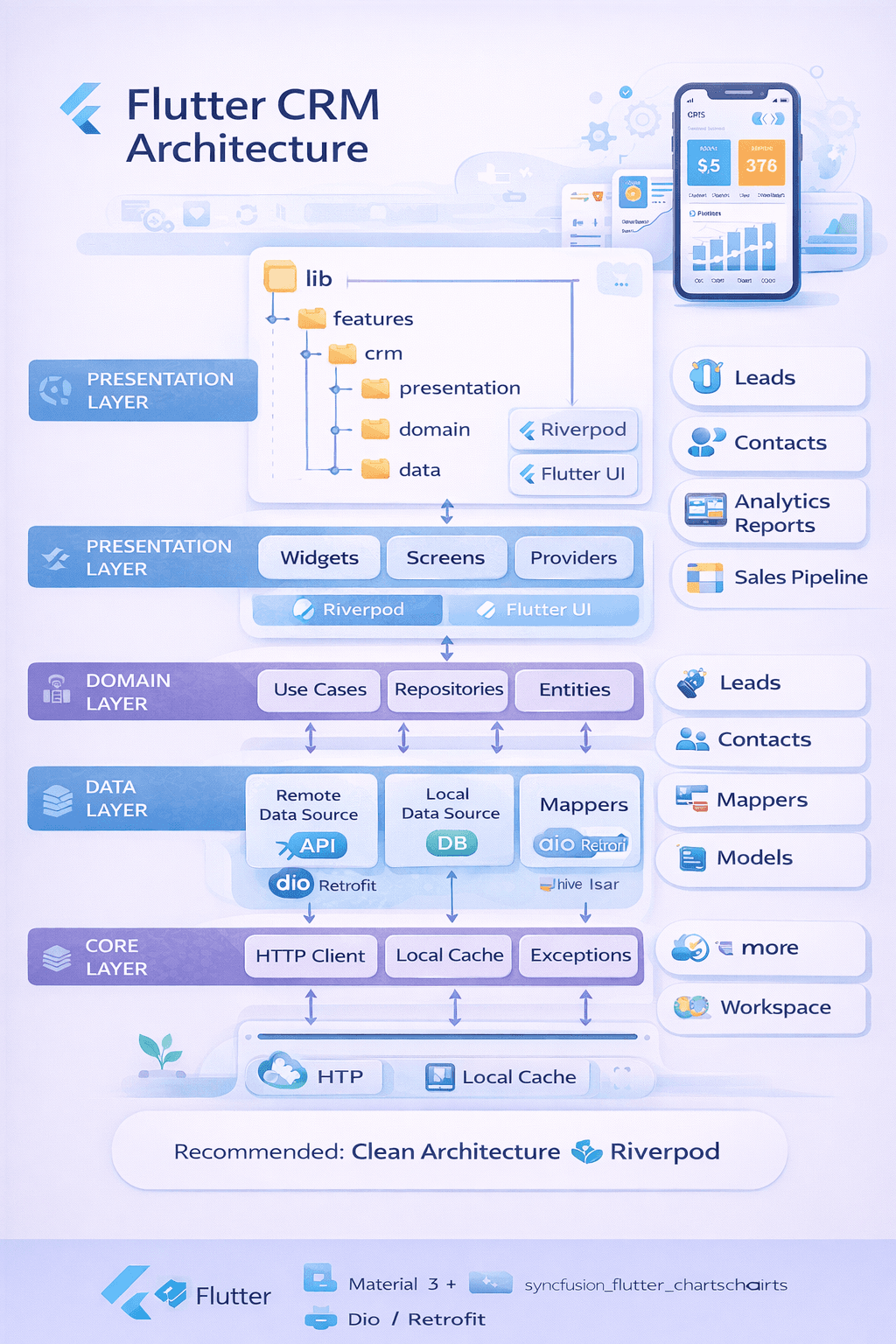
Clean Architecture, as popularized by Robert C. Martin (Uncle Bob), separates concerns into concentric layers. For Flutter, this usually translates to three layers: Presentation (UI), Domain (business logic), and Data (repositories, data sources). This separation makes the app easier to test, maintain, and evolve.
Domain Layer (Core Business Logic) – Contains entities, use cases (interactors), and repository interfaces. This layer has no dependencies on Flutter or external frameworks. Example: GetLeadsUseCase that takes a LeadRepository interface and returns a list of Lead entities.
Data Layer – Implements repository interfaces defined in the domain layer. It handles data sources: remote (API) and local (database). Uses Data Transfer Objects (DTOs) that are mapped to domain entities. Example: LeadRepositoryImpl uses LeadRemoteDataSource and LeadLocalDataSource.
Presentation Layer – Flutter widgets, BLoCs/Cubits/Providers, and UI logic. This layer consumes use cases and observes state changes. It should contain no business logic—only how to display data and handle user interactions.
Dependency Injection – Use get_it or provider to inject dependencies, keeping layers decoupled.
Folder structure example:
lib/
├── domain/
│   ├── entities/
│   │   └── lead.dart
│   ├── repositories/
│   │   └── lead_repository.dart
│   └── use_cases/
│       └── get_leads.dart
├── data/
│   ├── models/
│   │   └── lead_dto.dart
│   ├── repositories/
│   │   └── lead_repository_impl.dart
│   └── datasources/
│       ├── lead_remote_datasource.dart
│       └── lead_local_datasource.dart
└── presentation/
    ├── pages/
    │   └── leads_page.dart
    ├── widgets/
    │   └── lead_card.dart
    └── bloc/
        └── lead_bloc.dart
3. State Management in CRM Apps
State management is critical in a CRM where data changes frequently—leads move through pipelines, tasks get completed, and real‑time updates arrive. Flutter offers several approaches. For complex apps, BLoC (Business Logic Component) or Riverpod are popular choices. Here’s a comparison:
| Approach | Best For | Pros | Cons |
|---|---|---|---|
| BLoC/Cubit | Large apps with complex business logic | Clear separation, testable, predictable state | More boilerplate, steeper learning curve |
| Riverpod | Mid‑to‑large apps | Compile‑safe, no BuildContext needed, flexible | Newer, ecosystem still maturing |
| Provider | Small to medium apps | Simple, built on InheritedWidget | Can lead to rebuild issues if not careful |
| GetX | Rapid development | Minimal boilerplate, reactive | Over‑reliance can violate separation of concerns |
Example using BLoC for lead management:
- Define events and states:
abstract class LeadEvent {}
class FetchLeads extends LeadEvent {}

abstract class LeadState {}
class LeadInitial extends LeadState {}
class LeadLoading extends LeadState {}
class LeadLoaded extends LeadState {
  final List<Lead> leads;
  LeadLoaded(this.leads);
}
class LeadError extends LeadState {
  final String message;
  LeadError(this.message);
}
- Implement the BLoC that uses a use case:
class LeadBloc extends Bloc<LeadEvent, LeadState> {
  final GetLeadsUseCase getLeads;
  LeadBloc(this.getLeads) : super(LeadInitial());

  @override
  Stream<LeadState> mapEventToState(LeadEvent event) async* {
    if (event is FetchLeads) {
      yield LeadLoading();
      try {
        final leads = await getLeads();
        yield LeadLoaded(leads);
      } catch (e) {
        yield LeadError(e.toString());
      }
    }
  }
}
- In the UI, use
BlocBuilderto react to state changes andBlocProviderto inject the BLoC.
Handling Real‑Time Updates & Offline Sync
A modern CRM must support real‑time collaboration and offline capabilities. Here’s how to approach these in Flutter:
- Real‑time updates: Use WebSockets or Firebase Realtime Database/Firestore. When a lead is updated on another device, the change is pushed to all connected clients. You can listen to changes in the data layer and emit new events to the BLoC.
- Offline support: Implement a local database (e.g.,
sqflite) as a cache. When the app launches, it loads data from local storage while simultaneously fetching updates from the remote source. Use a background sync mechanism (e.g.,workmanagerfor periodic sync) to keep local data fresh. - Conflict resolution: When both local and remote data change, implement a strategy—either “last write wins” or manual conflict resolution via UI. For CRM data, timestamps help determine the latest version.
Testing Strategies for CRM Apps
Given the importance of data integrity, thorough testing is essential. Clean architecture naturally facilitates testing because layers are decoupled.
- Unit tests – Test use cases and domain logic in isolation using mock repositories. Use
mocktailormockito. - Widget tests – Test individual widgets with mocked BLoCs to verify UI rendering and user interactions.
- Integration tests – Test critical flows (e.g., creating a lead, moving a deal) against a test backend or a local mock server.
- Golden tests – For complex dashboards, use golden tests to catch unintended UI regressions.
Conclusion: Build for Scale, Maintainability, and UX
Building a CRM in Flutter is a rewarding endeavor that combines the flexibility of cross‑platform development with the power of modern architecture. By adopting clean architecture, you ensure your codebase remains manageable as features multiply. Choosing the right state management pattern (like BLoC) gives you predictable state handling and testability. And adding offline support and real‑time sync transforms the app into a reliable tool for sales and support teams. Start with a solid foundation, iterate based on user feedback, and you’ll deliver a CRM that your organization will love to use.
💻 **Ready to start building?** [Download our Flutter CRM Starter Kit](/resources/flutter-crm-starter) with clean architecture templates, BLoC examples, and offline sync implementation. Or, join our developer community for weekly architecture discussions.
Share This Article
📤 Share This